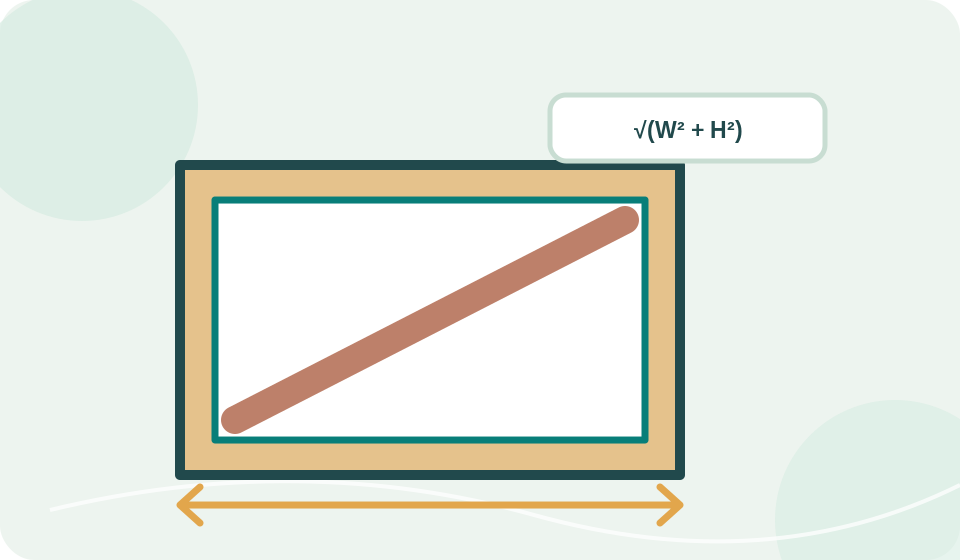

Measure between frame corners
Width is the horizontal distance between the corners that define the rectangular frame; height is the vertical distance. Both fields use feet and must be positive. Measure the frame itself, not the whole fence opening if posts, hinge gaps, or latch clearances reduce the actual frame dimensions.
A diagonal runs from one corner to the opposite corner. The calculator returns that ideal geometric length before allowance. If the frame is not square, has a curved top, or includes an offset joint, one width and height pair cannot describe its brace path.
Use the Pythagorean relation
The diagonal is √(width² + height²). Squaring each perpendicular side, adding those areas, and taking the square root gives the straight-line distance between opposite corners. Keep both sides in the same unit. Because both dimensions are in feet, the diagonal is also in feet.
This is a layout length, not a stress calculation. The calculator does not determine which way a compression brace should slope, how loads travel to the hinge and latch posts, or whether a tension cable or other system is appropriate. The gate design and materials decide those details.
Add cut allowance in the correct unit
The allowance field is in inches, even though the width and height are in feet. The tool divides the entered allowance by 12 and adds it to the diagonal: cut length = diagonal + allowance inches ÷ 12. The field permits zero through 10,000 inches, while the width and height must be positive.
An allowance may help with fitting or end cuts, but it is not a mitre calculation. A diagonal that terminates between two rails can require angled cuts and particular bearing surfaces. Mark the actual endpoints and joint geometry before cutting; add only the extra length intended for that cut plan.
Check brace direction and construction
A diagonal can work in tension or compression depending on its orientation and how the gate is loaded. The length calculation cannot identify the correct direction by itself. Hinge location, latch support, wood movement, fastener withdrawal, joint strength, and the weight of the infill all matter.
For livestock or public areas, consider openings and entrapment hazards as well as strength. Penn State Extension’s fence-planning guidance discusses gate design and cautions that some diagonal brace layouts can create trapping spaces for horses. Follow a suitable gate design for the use rather than treating the calculator as an approval.
Use the result as one dimension in a cut list
The displayed diagonal and allowance-adjusted length are rounded to four decimal places. Preserve the unrounded measurement for layout, then verify a full-size diagonal across the actual frame before cutting. Frame joints may change the distance between the brace’s bearing points from the outside corner measurements.
This tool does not add waste for failed cuts, calculate stock board quantities, or test gate sag. If you need lumber volume or piece counts, take those dimensions separately. The board foot calculator calculates nominal dimensional volume from a repeated lumber size; it does not convert this diagonal into a structural member recommendation.
Worked examples
The examples use feet for the rectangular sides and inches for the extra fitting length. The allowance is converted to feet before being added.
A four-by-six-foot gate frame
Inputs: Frame width 4 ft; height 6 ft; cut allowance 2 in.
Calculation: Diagonal = √(4² + 6²) = √52 = 7.2111026 ft; allowance = 2 ÷ 12 = 0.1666667 ft; total cut-length estimate = 7.3777692 ft.
The calculator displays about 7.2111 ft for the diagonal and 7.3778 ft with allowance. Verify the endpoint and joint measurements against the built frame.
A three-by-five-foot frame with a 1.5-inch allowance
Inputs: Frame width 3 ft; height 5 ft; cut allowance 1.5 in.
Calculation: Diagonal = √(3² + 5²) = √34 = 5.8309519 ft; extra = 1.5 ÷ 12 = 0.125 ft; cut estimate = 5.9559519 ft.
The allowance-adjusted result is about 5.9560 ft. It is not a brace-direction or connection design.
